Quick Summary
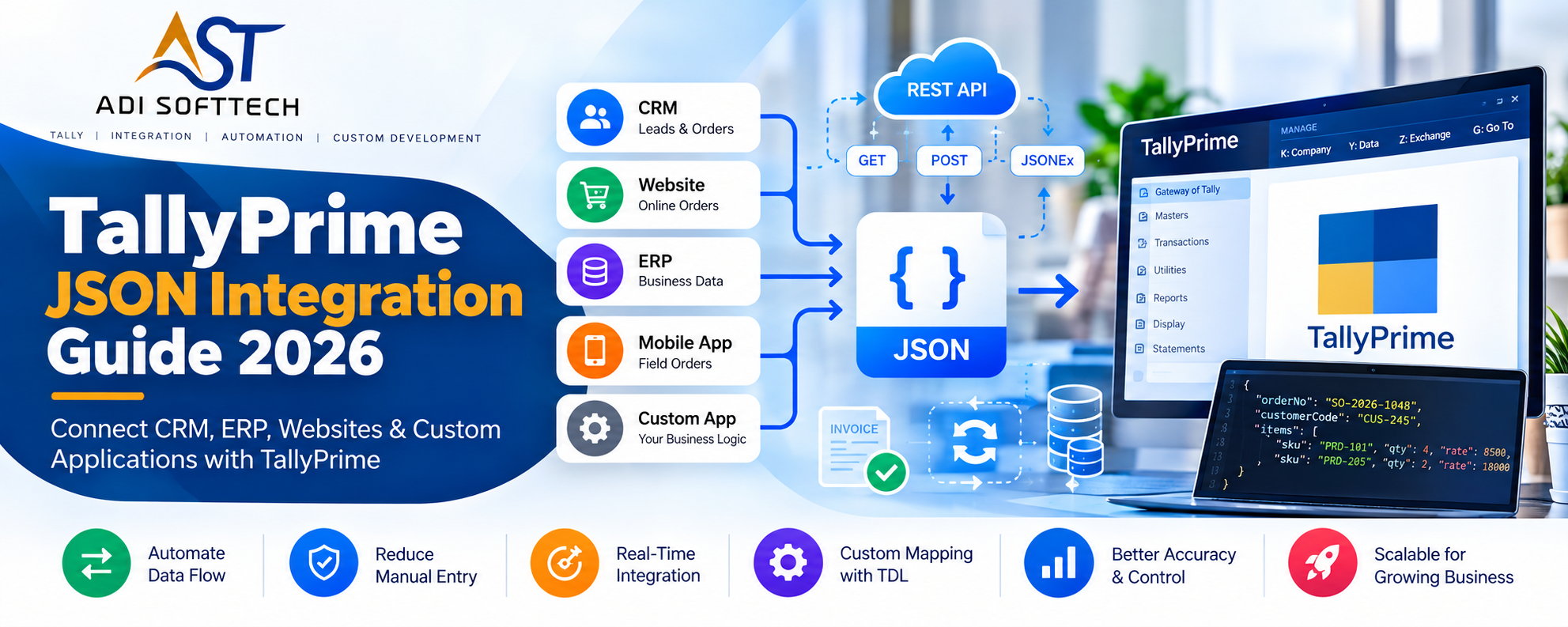
Learn TallyPrime JSON integration with practical, copy-ready TDL examples. Understand JSONEx, REST APIs, JSON reading, CRM/ERP integration, middleware, data mapping, duplicate prevention and real-world automation.
TallyPrime JSON Integration Guide 2026: Connect CRM, ERP, Websites & Custom Applications with TallyPrime
For many businesses, TallyPrime is no longer the only software involved in day-to-day operations.
A sales team may work in a CRM. Orders may come from a website or mobile application. A distributor may use a custom order-management system. Management may use a separate dashboard, while the accounts team continues to work in TallyPrime.
The real challenge begins when the same information has to move between these systems.
This is where TallyPrime JSON integration becomes extremely useful.
With modern JSON-based integration, TallyPrime can participate in a connected software environment where business information can move between TallyPrime and CRM, ERP, web applications, mobile applications and other custom software.
In this guide, we will understand JSON integration from a practical business and developer perspective: how the architecture works, where TDL is required, how JSONEx changes modern integration, and what should be considered before implementing a production integration.
What is JSON?
JSON stands for JavaScript Object Notation. It is a lightweight text format commonly used for exchanging structured information between applications.
For example, imagine that a CRM has confirmed an order:
{ "orderNumber": "SO-2026-1048", "customer": { "code": "CUS-245", "name": "Eastern Retail Pvt Ltd" }, "orderDate": "2026-10-06", "items": [ { "sku": "PRD-101", "name": "Premium Office Chair", "quantity": 4, "rate": 8500 }, { "sku": "PRD-205", "name": "Executive Desk", "quantity": 2, "rate": 18000 } ], "orderValue": 70000, "status": "Approved" }
This is a completely different example from Tally's documentation, but it demonstrates why JSON is popular: both developers and applications can understand the structure relatively easily.
Why is JSON Integration Important for TallyPrime?
Consider a company using:
- CRM for leads and quotations
- Custom application for sales orders
- TallyPrime for accounting
- Management dashboard for analytics
Without integration, employees may repeatedly enter the same customer, order and invoice information.
CRM ↓ Manual Entry ↓ TallyPrime ↓ Manual Update ↓ CRM
A properly designed integration can change this to:
CRM ↕ API / Middleware ↕ JSON ↕ TallyPrime
The objective is not simply to “send JSON”. The objective is to create a reliable business process with validation, mapping, duplicate prevention and proper status handling.
Native JSON Support in TallyPrime
A major development in modern TallyPrime integration is native JSON support.
From TallyPrime 7.0 onward, JSON can be used as a native data-exchange format in supported integration scenarios. This gives developers another modern option alongside established XML-based integrations.
For businesses building new CRM, ERP, SaaS or web integrations, this is important because JSON is already the standard format used by many modern APIs.
Native JSON vs Custom JSON in TallyPrime
This distinction is extremely important.
1. Native JSON
Native JSON follows the structure TallyPrime expects.
If an external application produces data in the required native structure, TallyPrime can consume it through supported native import/data-push mechanisms without requiring custom TDL merely to translate the incoming structure.
2. Custom or Non-Native JSON
Most existing applications do not design their JSON around TallyPrime.
A CRM may return:
{ "accountId": "AC-785", "companyName": "Eastern Retail Pvt Ltd", "mobile": "9876543210", "creditDays": 30 }
Another ERP may call the same information:
{ "partyCode": "AC-785", "partyName": "Eastern Retail Pvt Ltd", "contactNo": "9876543210", "paymentTerm": "NET30" }
Neither external application should necessarily be forced to change its internal API just because TallyPrime is being integrated.
This is where TDL and/or middleware can become important. The external structure can be read, interpreted, mapped and transformed into the business structure required by TallyPrime.
When Do You Need TDL for JSON Integration?
Not every JSON integration requires the same amount of TDL development.
If the incoming information already follows a supported native TallyPrime structure, the amount of custom mapping may be limited.
TDL becomes particularly useful when:
- The external API uses custom JSON.
- JSON needs to be read from an external API.
- A local JSON file needs to be processed.
- Only selected fields should be processed.
- External fields need to be mapped to TallyPrime masters.
- Business validation is required.
- Custom TallyPrime data needs to be exported.
- A custom report must produce structured JSON.
- TallyPrime needs to initiate HTTP communication.
TallyPrime Can Work as a Server or a Client
This concept is one of the most useful things to understand when designing an integration.
TallyPrime as Server
An external application initiates communication.
CRM / ERP / Website ↓ HTTP Request ↓ TallyPrime ↓ JSON Response
The external application might request information from TallyPrime or push information into TallyPrime.
TallyPrime as Client
TallyPrime initiates communication with another application.
TallyPrime ↓ TDL Process ↓ HTTP GET / POST ↓ External API ↓ JSON Response
For example, a user could trigger a process in TallyPrime that requests an approved order from a company's internal API.
Online JSON Integration
Online integration is useful when information needs to move between systems over HTTP.
A typical architecture might be:
Sales Application ↓ Backend API ↓ JSON Request ↓ Integration Layer ↓ TallyPrime
Or in the opposite direction:
TallyPrime ↓ TDL ↓ HTTP Request ↓ Backend API ↓ CRM / ERP Database
GET and POST operations can be used in supported TDL/API workflows depending on the direction and requirement.
Offline JSON Integration
Not every company needs real-time API communication.
Some businesses may receive a JSON file from another system and process it periodically.
External Software ↓ JSON File ↓ TDL Collection / Import Process ↓ Validation ↓ TallyPrime
This can be useful when:
- The external software does not expose an API.
- Data is transferred once per day.
- Systems are located on isolated networks.
- Batch processing is sufficient.
Reading a Local JSON File Using TDL
TDL provides capabilities for reading JSON from file-based sources and mapping the resulting JSON objects into collections.
Relevant modern concepts include data sources such as FileJSON and JSONString, together with JSON object/path capabilities.
Conceptually:
JSON File ↓ FileJSON / JSONString ↓ JSON Object Path ↓ TDL Collection ↓ Required Methods ↓ Business Processing
This is useful when a third-party application produces its own JSON structure and you need to process selected values inside TallyPrime.
Copyable TDL Example: Read Orders from a Local JSON File
Assume the external application creates a file named approved-orders.json with an orders array. The following collection uses the documented File JSON data source and JSON Object Path.
[Collection : AST Approved Orders JSON]

    Data Source      : File JSON : "C:\ADISOFTTECH\Data\approved-orders.json"
    JSON Object Path : "orders:1"
Implementation note: Change the file path and JSON object path to match your real JSON structure. This example demonstrates the supported collection/data-source pattern; the processing logic you add afterward depends on your fields and business rules.
Sample JSON File for Testing
{
  "orders": [
    {
      "orderNo": "SO-2026-2101",
      "customerCode": "CUS-501",
      "customerName": "Apex Office Solutions",
      "amount": 48500,
      "status": "Approved"
    },
    {
      "orderNo": "SO-2026-2102",
      "customerCode": "CUS-508",
      "customerName": "Brightline Traders",
      "amount": 32750,
      "status": "Approved"
    }
  ]
}
Reading JSON from an External API
A more modern scenario is reading JSON directly from an API.
For example, suppose an internal order-management API returns:
{ "success": true, "orders": [ { "orderNo": "ORD-5101", "customerCode": "CUST-41", "customerName": "Nova Distribution", "amount": 42800 }, { "orderNo": "ORD-5102", "customerCode": "CUST-89", "customerName": "Metro Office Supplies", "amount": 31500 } ] }
A custom TDL solution could read the relevant response through supported HTTP JSON data-source capabilities and process the required objects.
External API ↓ HTTP GET / POST ↓ JSON Response ↓ TDL Collection ↓ JSON Object Path ↓ Order Objects ↓ Validation / Mapping
Copyable TDL Example: Read Approved Orders from an API
For a GET request, a collection can use HTTP JSONEx as the data source. The URL below is intentionally a placeholder; replace it with your own API endpoint.
[Collection : AST API Approved Orders]

    Data Source      : HTTP JSONEx : "https://api.example.com/tally/approved-orders"
    JSON Object Path : "orders:1"
Important: The endpoint must return JSON whose structure matches the object path. Authentication headers, request parameters and production security must be added according to the API being integrated.
Reading a JSON String Directly in TDL
When JSON already exists in a formula or variable, an intermediate file is not always necessary. TDL supports JSON String as a collection data source.
[Collection : AST JSON String Orders]

    Data Source      : JSON String : @@ASTOrderJson
    JSON Object Path : "orders:1"
Here @@ASTOrderJson represents a system formula that evaluates to a JSON string. A system variable can also be used where appropriate.
Understanding JSON Object and Array Mapping
A useful mental model is:
JSON Object → Tally/TDL Object concept JSON Array → Collection concept Boolean → Logical value Number → Numeric value String → Appropriate textual/date/amount-style value
The actual Tally data type used depends on the destination and context.
This relationship helps developers understand why collection design is so important when processing JSON.
Fetching Data from TallyPrime Through JSON
JSON-based requests can fetch different kinds of TallyPrime information.
Depending on the request, the target can conceptually be:
- Object – a particular object
- Collection – a group of objects
- Data/Report – report-oriented information
- Function – a function result
This means integration is not restricted to “export all accounting data.” A well-designed API should request only what the external application actually needs.
Understanding the HTTP Request Structure
A JSON request to TallyPrime has two broad parts:
Request Headers
Headers describe how the request should be interpreted.
Important concepts include:
- Content type
- Version
- Import or export operation
- Entity type
- Requested definition/object identifier
- Optional detailed response behavior
Copyable Example: JSON Export Request Headers
The following shows the documented header pattern for requesting a collection. Replace the collection ID with the definition you actually intend to fetch.
content-type: application/json
version: 1
tallyrequest: Export
type: Collection
id: Ledger
For production requests, also provide the required payload/static variables such as the current company and export format as applicable to the operation and TallyPrime version.
Request Body
The body contains the actual data or parameters required for the operation.
Depending on the operation, it may contain information corresponding to:
- System/static variables
- Repeated variables
- Fetch requirements
- Function parameters
- TDL definitions
- Business data being imported
Why Selecting the Correct Company Matters
This is an easy integration mistake to underestimate.
If several companies are loaded in TallyPrime, an integration should explicitly control which company is being used for the exchange.
Do not design production integrations around the assumption that “the correct company will always be active.”
Incoming Request ↓ Identify Company ↓ Validate Company ↓ Process Data
This small design decision can prevent a very serious accounting problem.
Example: CRM Customer to TallyPrime
Imagine that a salesperson creates a new customer in a CRM.
The CRM stores:
{ "customerId": "CRM-C-1108", "businessName": "Sunrise Electricals", "state": "West Bengal", "mobile": "9830000000", "email": "accounts@example.com", "creditLimit": 150000 }
The integration should not blindly create a ledger.
A better workflow is:
CRM Customer ↓ Receive JSON ↓ Validate Required Fields ↓ Search Mapping Table ↓ Check Existing Ledger ↓ Map CRM Fields ↓ Create / Update Tally Master ↓ Store Tally Reference ↓ Return Result to CRM
This is where integration becomes a business solution rather than simply a data-transfer script.
Example: Sales Order from CRM to TallyPrime
Now consider an approved CRM order.
{ "orderNo": "SO-88021", "customerCode": "CRM-C-1108", "items": [ { "sku": "LED-18W", "quantity": 50, "rate": 240 }, { "sku": "LED-12W", "quantity": 30, "rate": 180 } ] }
Before creating anything in TallyPrime, the integration should check:
- Does the customer mapping exist?
- Do all stock items exist?
- Are units compatible?
- Are quantities valid?
- Has this order already been processed?
- Is the order approved?
Only after these checks should the accounting workflow continue.
Importing Masters and Vouchers Through JSON
Supported native JSON structures can be used for master and voucher import workflows.
But production systems should surround import with business controls.
JSON Request ↓ Technical Validation ↓ Business Validation ↓ Duplicate Check ↓ Master Mapping ↓ Import ↓ Read Response ↓ Update External System
Understanding the JSON Response
An integration should never assume that an HTTP request succeeded simply because it reached TallyPrime.
The response needs to be interpreted.
Depending on the request type, response information can include operation status, company/import information, returned data, objects or function results.
The external system should use that response to decide whether to mark the transaction as successful, failed or pending for retry.
Example Response Handling Structure
const response = await sendToTallyPrime(payload);

if (response.status === "1" || response.status === 1) {
  await markIntegrationSuccess({
    externalId: order.orderNo,
    processedAt: new Date()
  });
} else {
  await markIntegrationFailed({
    externalId: order.orderNo,
    response
  });
}
Note: This JavaScript is an application-side pattern, not TDL. Adapt it to your backend framework and to the exact response returned by the TallyPrime operation you are using.
JSON vs JSONEx: One of the Most Important Changes
If you are planning a new TallyPrime JSON integration, understanding JSONEx is particularly important.
Earlier JSON export capabilities could become awkward for complex report structures because repeated report elements did not always translate into the clean array-based JSON structure modern applications expect.
JSONEx provides a more structured representation for supported TallyPrime data-exchange scenarios.
Simple Conceptual Difference
An awkward structure might conceptually look like:
{ "product": "Chair", "amount": 25000, "product": "Desk", "amount": 40000 }
Repeated keys at the same object level are not a good structure for modern JSON processing.
A cleaner array-oriented structure is:
{ "products": [ { "name": "Chair", "amount": 25000 }, { "name": "Desk", "amount": 40000 } ] }
This is not copied from Tally's example; it simply demonstrates why predictable arrays and unique keys are valuable.
Why JSONEx Matters
- Cleaner structured output
- More predictable JSON
- Proper array representation
- Better compatibility with modern application parsers
- Easier API consumption
- Reduced custom transformation work
For new supported integrations, JSONEx should normally be evaluated first rather than designing around older JSON output solely for historical compatibility.
JSON vs XML for TallyPrime Integration
| Area | JSON | XML |
|---|---|---|
| Modern REST APIs | Very common | Less common in new APIs |
| Human readability | Compact | More verbose |
| Existing Tally integrations | Growing rapidly | Very established |
| Web/mobile development | Excellent fit | Supported but less typical |
| Legacy integrations | Depends on system | Very common |
JSON does not make XML obsolete. The correct choice depends on the existing architecture, TallyPrime version, external application and project requirements.
Where Middleware Fits into TallyPrime JSON Integration
A common mistake is trying to put the entire integration inside TDL.
TDL is powerful, but a modern integration may also need:
- OAuth authentication
- JWT tokens
- Cloud databases
- Webhooks
- Background queues
- Scheduled jobs
- Centralized logs
- Automatic retries
- Multiple third-party APIs
In such cases, a better architecture can be:
TallyPrime ↕ TDL ↕ JSON / JSONEx ↕ Middleware (Node.js / Python / FastAPI) ↕ CRM / ERP / Website / Database
One-Way vs Two-Way JSON Integration
One-Way Integration
CRM → TallyPrime
Example: only approved sales orders are transferred to TallyPrime.
Two-Way Integration
CRM ↔ TallyPrime
Example:
CRM ↓ Approved Order ↓ TallyPrime ↓ Invoice Created ↓ Invoice Reference ↓ CRM
Two-way integration is more powerful, but it requires stronger mapping and conflict-handling rules.
Duplicate Prevention Is Essential
Suppose the CRM sends order SO-88021.
TallyPrime processes it successfully, but the network connection drops before the CRM receives confirmation.
The CRM retries.
Without duplicate protection, the same business transaction may be processed twice.
Copyable Middleware Example: Basic Duplicate Check
async function processOrder(order) {
  const existing = await integrationLog.findOne({
    externalId: order.orderNo,
    status: "SUCCESS"
  });

  if (existing) {
    return {
      success: true,
      skipped: true,
      message: "Order already processed"
    };
  }

  // Validate masters and send the transaction to TallyPrime here.
  // Save SUCCESS only after the TallyPrime response is confirmed.
}
For a production system, enforce uniqueness at the database level as well. Application-only duplicate checks can still race when multiple requests arrive at the same time.
A reliable design can use:
- External transaction ID
- Unique order/invoice reference
- Mapping table
- Processing status
- Pre-import duplicate check
- Integration logs
Error Handling for JSON Integration
Real integrations eventually encounter failures.
A production design should expect:
- TallyPrime unavailable
- API unavailable
- Invalid JSON
- Missing customer
- Missing stock item
- Invalid unit
- Incorrect company
- Timeout
- Duplicate request
- Partial batch failure
Instead of simply displaying “Import Failed”, record enough information to understand what happened.
Request ID Transaction ID Request Time Source System Target Company Processing Status Error Message Retry Count Final Result
Security Considerations
Connecting accounting software to another system creates a security responsibility.
A production integration should consider authentication, HTTPS, API authorization, network access, credential storage, input validation, audit logging and user permissions.
Avoid unnecessarily exposing TallyPrime directly to the public internet. In many architectures, a controlled middleware/service layer is a safer and more manageable design.
Real Business Applications of TallyPrime JSON Integration
- CRM Integration: customers, orders, invoices and outstanding information.
- ERP Integration: operational ERP connected with TallyPrime accounting.
- Website Integration: approved website transactions transferred to accounting.
- E-Commerce: order and accounting workflow automation.
- Mobile Sales App: salesperson orders transferred through backend APIs.
- Distributor Management System: distributor orders synchronized with accounting.
- Custom SaaS: business application and TallyPrime working as connected systems.
- Management Dashboard: selected TallyPrime information supplied to analytics systems.
A Practical Architecture for Modern Tally Integration
┌──────────────────┐ │ Web / Mobile │ │ CRM / ERP │ └────────┬─────────┘ │ REST API │ ┌────────▼─────────┐ │ Middleware │ │ Node / FastAPI │ └────────┬─────────┘ │ JSON / JSONEx │ ┌────────▼─────────┐ │ TDL │ └────────┬─────────┘ │ ┌────────▼─────────┐ │ TallyPrime │ └──────────────────┘
This architecture is not mandatory for every project, but it is a useful pattern when business requirements go beyond simple data exchange.
Common Mistakes in TallyPrime JSON Integration
- Sending data without validating masters.
- Not storing external transaction references.
- Assuming every HTTP response means success.
- Hardcoding company names and mappings everywhere.
- Ignoring retries and duplicate requests.
- Trying to handle every responsibility only in TDL.
- Not testing with realistic data volume.
- Ignoring security.
- Using older JSON structures for a new project without evaluating JSONEx.
- Creating an integration without defining which system owns each master.
JSON Integration Development Checklist
Before development starts, answer these questions:
- Which system is the source?
- Which system owns customer masters?
- Which system owns product masters?
- Is the integration one-way or two-way?
- Real-time or scheduled?
- Native JSON or custom JSON?
- Is TDL mapping required?
- Is middleware required?
- How are duplicates identified?
- How are errors logged?
- How are failed transactions retried?
- Which company in TallyPrime receives the transaction?
- What happens when a master is missing?
- What security mechanism protects the API?
How to Use the Code Examples in This Guide
Every technical example marked Copy Code is displayed as read-only content. Visitors can copy it but cannot edit the code directly inside the article. TDL examples use documented TallyPrime integration constructs, while API URLs, company data and business objects are original demonstration values created for this guide.
Always test copied code in a development or backup environment first. File paths, JSON paths, URLs, authentication, company selection, TallyPrime release and the actual external JSON structure must match your implementation.
Frequently Asked Questions
Does TallyPrime support JSON integration?
Yes. Modern TallyPrime supports JSON-based integration, with native JSON capabilities available from TallyPrime 7.0 for supported data-exchange scenarios.
What is JSONEx in TallyPrime?
JSONEx is an enhanced structured JSON representation designed to provide cleaner and more predictable JSON for supported integration scenarios.
Should new integrations use JSON or JSONEx?
For a new supported integration, JSONEx should be evaluated first because it is intended to provide a better structured representation. Older JSON capabilities remain relevant for backward compatibility.
Can TallyPrime read JSON from an API?
Yes. TDL provides HTTP-oriented JSON capabilities that can be used to consume external JSON in supported scenarios.
Can TallyPrime read a local JSON file?
Yes. TDL includes file/string-oriented JSON data-source capabilities for supported file-based workflows.
Can an external application fetch data from TallyPrime in JSON?
Yes. Depending on the requirement, information can be requested through Object, Collection, Data/Report or Function-oriented requests.
Can we create masters using JSON?
Supported native JSON import workflows can be used for master creation or modification, subject to the required structure and validation.
Can vouchers be imported through JSON?
Yes, supported voucher import workflows can use the appropriate native JSON structure.
Is TDL compulsory for every JSON integration?
No. If information already follows a supported native TallyPrime structure, custom TDL may not be required simply to translate the data. Custom/non-native JSON often requires TDL or middleware mapping.
Can TallyPrime call an external REST API?
TallyPrime can initiate supported HTTP communication through TDL capabilities. More complex authentication or cloud workflows may be better handled through middleware.
Can TallyPrime integrate with a CRM using JSON?
Yes. CRM integration can exchange customers, orders, invoice references, outstanding information and other selected business data depending on the design.
Can TallyPrime integrate with a website or mobile app?
Yes. Normally the website/mobile application communicates through a backend or middleware layer, which then exchanges required information with TallyPrime.
Which is better for Tally integration: JSON or XML?
Both are useful. JSON is a natural fit for many modern web/API applications, while XML remains important in established Tally integrations. The best choice depends on the existing architecture.
How ADISOFTTECH Can Help with TallyPrime JSON Integration
At ADISOFTTECH, we work on TallyPrime customization, TDL development and software integration requirements where accounting needs to communicate with other business applications.
Our integration work can include:
- TallyPrime JSON integration
- JSONEx integration
- Tally API integration
- Custom JSON reading using TDL
- CRM to TallyPrime integration
- ERP to TallyPrime integration
- Website and web application integration
- Custom software integration
- XML and JSON data exchange
- Excel/CSV automation
- Middleware development using Node.js or Python/FastAPI
- Custom TDL reports and business automation
Pradeep Ray, founder of ADISOFTTECH, has more than 13 years of experience working with Tally customization, TDL development, integration and business automation requirements.
If your business currently enters the same information in TallyPrime and another application, it may be worth evaluating whether that workflow can be automated.
Discuss Your TallyPrime Integration Requirement with ADISOFTTECH
Related Resources
Read our complete TDL Developer Guide to understand Collections, Functions, XML, JSON, Excel, CSV and API integration.
Read our Tally Customization and TDL Development Guide.
Technical concepts in this article were independently written after reviewing the official TallyPrime JSON integration documentation. Developers should always verify exact syntax, version compatibility and implementation details against the current official documentation before deploying a production solution.